Most small and mid-sized companies have already paid the cost of a build that ran 30% over budget, slipped a quarter past launch, and arrived missing the integrations the founder thought were obvious. The reason is almost never that engineers can't write code. It is that the project was started before anyone agreed on what would be true at launch — and re-quotes happen every time reality intrudes on that ambiguity.
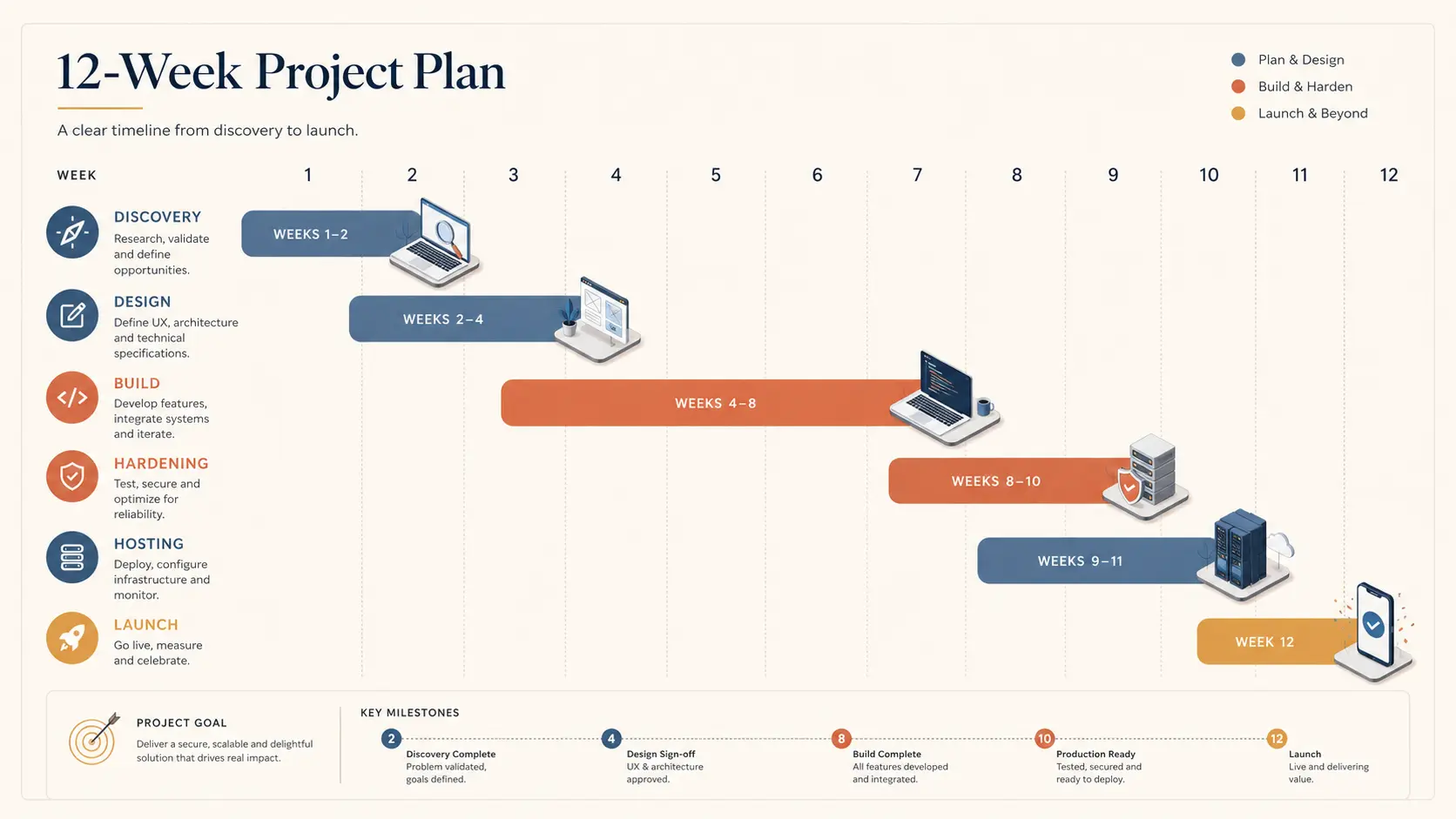
A disciplined greenfield build for an integrated web site + information management system (IMS) + mobile app is a 90-day project for a small-to-mid scope, or two 90-day cycles for a larger one. The shape below is what we run internally, and what we hand to clients on day one so the timeline is not a black box. It covers planning, building, the non-obvious considerations that catch teams out, and the hosting story.
Week 1–2: Discovery and Scoping
The first two weeks are not "starting to build." They are the cheapest insurance the project will ever buy. The deliverables are four documents: a one-page product brief (who the user is, what they leave the system having done, what the business measures), a feature inventory split into "must launch with," "nice to have at launch," and "post-launch," a data model sketch covering every entity the IMS will own, and a hosting and integration map naming every third-party service the system will call.
The non-obvious deliverable in this phase is the list of decisions the client owns. Most overruns are not engineering mistakes; they are decisions that nobody flagged as needing a human choice. "What happens when a customer cancels in month two of a yearly subscription?" is a five-minute conversation in week one and a three-day refactor in week eight.
Week 3: Design and Architecture Lock
Week three is one week of dedicated design lock. UI wireframes for the top 10 screens, a clickable Figma flow for the highest-volume user journey, an architecture diagram naming the framework, database, queue, cache, and hosting tier, and a written set of non-functional requirements: target page-load budget, expected peak concurrency, accessibility baseline (WCAG 2.2 AA is the 2026 default), and the data-retention policy.
The non-functional requirements list is where teams chronically under-invest. A client who hasn't been asked "what is acceptable downtime per quarter?" will assume "zero." That assumption costs three to ten times the project's hosting budget. Better to surface the number, price the SLA, and let the client pick.
Week 4–9: Build, in Two-Week Increments
Six weeks of build in three two-week sprints, each ending in a working demo against real data. The first sprint covers authentication, the data model, and the highest-volume CRUD flow. The second sprint covers the integrations (payment, email, search, file storage) and the IMS back office. The third sprint covers the mobile app, the public-facing site polish, and the reporting layer.
A few discipline points that prevent the "where did the time go?" feeling: every sprint demo runs against staging seeded with realistic data, not lorem ipsum; every integration is wired end-to-end before the next sprint starts, not stubbed for later; every build has a deployable Docker image at the end of each week.
Week 10: Hardening and Performance
Week ten is dedicated to the work that gets shortcut on every undisciplined project. Security review (OWASP Top 10, parameterized queries audit, CSP headers, rate limits, authentication flow review). Performance review (Core Web Vitals on every templated page, database index review on every common query, N+1 query hunt). Accessibility review (keyboard navigation on every flow, color-contrast audit, screen-reader pass). The output is a defect list with severity tags, and the engineering team works only on critical and high tickets for the rest of the week.
This week pays for itself the first time the client sees a real Lighthouse score above 95 and a real OWASP ZAP scan with no high-severity findings. It is also the week most agencies skip in order to "save time" and then absorb in unpaid post-launch support.
Week 11: Hosting, Observability, and DR
Hosting is a deliverable, not an afterthought. The output of week eleven is a documented, reproducible production environment: an Nginx-fronted PHP-FPM or Node tier behind a load balancer, a managed MySQL instance with point-in-time recovery, an object store for files, and observability covering uptime, error rate, and response time at the page level. A disaster-recovery runbook covers what to do when the database goes down, when the application returns 5xx, when DNS misroutes traffic, and when a deploy needs to be rolled back. Every step is written down with the command to run and the person on call.
Two non-obvious choices for SMBs: managed database over self-hosted (the operational overhead of running your own MySQL is not worth saving the $80/month for a 50K-user system), and CDN in front of every public asset by default (Cloudflare is the cheap-and-good baseline for 2026).
Week 12: Launch, Handover, and the First Month of Maintenance
The final week is launch and handover. Launch is staged: soft-launch to internal users on day one, an invited beta on day three, public launch on day five. Each stage has a rollback plan and an explicit go/no-go decision based on the error-rate and conversion metrics agreed in week one.
Handover is a documented artifact, not a verbal walkthrough. Source code with a tagged 1.0 release, a deployment runbook, an incident-response runbook, the architecture diagram, the data model, all credentials transferred to the client's password manager, and a 60-minute recorded walkthrough for the client's future hires. A maintenance contract starts the day of public launch — typically a fixed monthly retainer covering security patches, dependency upgrades, an agreed number of small-feature hours, and on-call coverage for incidents.
The Three Considerations That Catch Most Projects
First: the integration nobody scoped. A client will mention "by the way, we'll need to send orders into our existing ERP" in week eight. Surface every integration in week one or it will eat the schedule.
Second: the content the client hasn't written. A site is not launchable without copy, images, legal pages, and the seed data for the IMS. Put the client's content-readiness on the same Gantt as the engineering work.
Third: the post-launch reality of operations. A site that nobody is paid to operate will degrade within six months. Sign the maintenance contract on the same day as the build contract. Clients will thank you in month seven.
The Outcome
Run this 12-week shape and the client gets a working, integrated web + IMS + mobile system, a documented production environment, a handover binder, and a maintenance contract that keeps the system healthy from day one. The agency gets a profitable project that finishes on time and a client who renews. The most expensive line item on this playbook is not engineering hours; it is the discovery weeks that prevent re-quotes. That trade is, in 2026, the best investment any SMB can make in a digital product.